Technical story 12 · Energy, industry and localisation
Ten technologies at a glance
Tap any one for its full session: the live 3D, how visitors interact, the technical breakdown, options and a downloadable PDF. Or take the guided tour of all ten.
- Read how it works
- Read how it works
- Read how it works
- Read how it works
- Read how it works
- Read how it works
- Read how it works
- Read how it works
- Read how it works
- Read how it works
These visuals are early-stage technical concept visualisations, not final photorealistic renders. Figures are FAIM design targets, not measured results. Concept and technology direction © FAIM. Download the full technical pack (PDF)
IKTVA Premium Connected Systems
Three systems on one local platform: registration and control, engineering stories, and visitor voices on the wall. Each one reports to the same control room, from check-in to the evening report.
Screens show demonstration data. Concept, experience design and technology direction by FAIM.
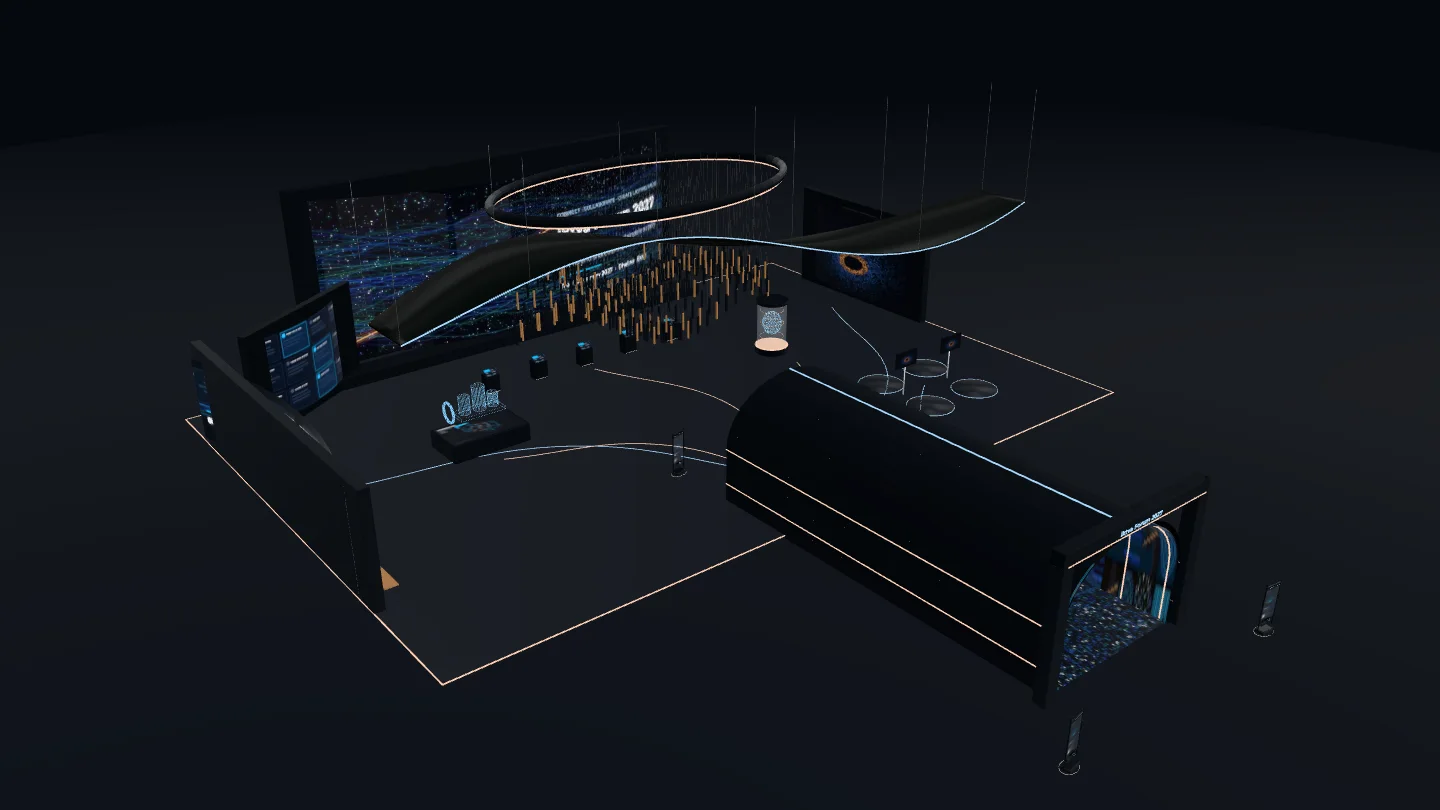
Picture Dhahran Expo on the second morning of the forum. A procurement lead from a Saudi valve manufacturer has twenty minutes between meetings. He walks past a dozen stands showing the same rendered pipeline on the same looping screen. Then he stops at one where he can touch a component, pull it apart in mid-air, and see which parts of it are now made in the Kingdom. He stays seven minutes, leaves his details, and books a follow-up. Nothing about the hardware was exotic. What held him was that the stand answered his question before he asked it.
That is the real job of IKTVA 2027 interactive technology. Not spectacle for its own sake, but a faster route from curiosity to a conversation worth having. The iktva Forum 2027 takes place from 11 to 14 January 2027 at Dhahran Expo, under the theme “A global platform for sustainable supply chains and shared prosperity”. Exhibitors will be speaking to buyers, investors and suppliers whose time is short and whose standards are high. Every screen on the floor is competing for minutes that matter.
The principle. At a localisation forum, an interactive stand should prove capability, not just claim it. Show what is made in the Kingdom, how it is made and who makes it, let visitors explore at their own depth, and hand every qualified conversation to a person who can take it forward.

This guide walks through the ten technologies we expect to shape the strongest stands at IKTVA 2027: what each one feels like for a visitor, the hardware and software behind it, how it carries a localisation message, how we would deliver it, and what we would measure. It closes with a visitor-journey diagram, a reference architecture, a phased delivery plan, and the practical side that decides whether any of it works on the day: risk, accessibility, data privacy and analytics.
What IKTVA is, and why 2027 raises the bar
iktva stands for In-Kingdom Total Value Add. It is Aramco’s programme for measuring and growing the share of value that its suppliers create inside Saudi Arabia, and it is now part of Aramco’s procurement process, so suppliers who want to do business with Aramco take part in it. The flagship iktva Forum and Exhibition is where that ecosystem meets.
The numbers behind the programme explain why the forum carries so much weight. According to Aramco, its iktva score for goods and services procurement rose from 35% in 2015 to 67% in 2024. In February 2026 Aramco announced that it had reached its 70% local content target and set an intention of 75% by 2030. Over the programme’s life, Aramco reports more than 350 investments from 35 countries in new manufacturing facilities in the Kingdom, backed by $9 billion of capital, 47 strategic products manufactured in Saudi Arabia for the first time, and more than 200 localisation opportunities across 12 sectors with an annual market size of $28 billion.
The 2025 edition, held from 13 to 16 January 2025 under the theme “Ecosystem of Opportunities”, saw Aramco sign 145 agreements and MoUs worth around $9 billion. For 2027 the forum’s own site lists more than 150 exhibitors, speakers, business opportunities and workshops, and the launch of TecShift, Aramco’s open innovation initiative connecting innovators and entrepreneurs with suppliers, investors and industry leaders.
So the audience at IKTVA 2027 is not browsing. It is looking for proof: proof of local manufacturing, local talent, local supply chains and technology that is ready to scale. That is exactly where interactive technology earns its place.
Where IKTVA meets Vision 2030
Saudi Vision 2030 rests on three pillars: a vibrant society, a thriving economy and an ambitious nation. iktva sits squarely inside the second. Its emphasis on local manufacturing and supply chains lines up with the National Industrial Development and Logistics Program, which aims to establish the Kingdom as a leading industrial economy and logistics hub. Its focus on Saudi jobs and skills ties it to the first.
For an exhibitor, this matters in a very practical way. The stories that land at IKTVA are Vision 2030 stories told through your own business: a plant in the Eastern Province that now makes what used to be imported, a training programme that put Saudi technicians on a production line, a supplier network that shortened lead times for an operator in the Eastern Province. Interactive technology is simply the most convincing way to let a visitor see those stories rather than read them.
The IKTVA 2027 interactive technology toolkit: ten options
Each technology below follows the same pattern, so you can compare them side by side: the visitor experience, the hardware, the software, the localisation value, how we would implement it, and what we would measure. None of them needs to be used alone. The strongest stands combine two or three into a single journey.
Reference images in this article are embedded from Pinterest and credited to their original pins. They are shown for reference only and are not FAIM projects.
1. Immersive LED tunnels and reactive entrances
Visitor experience. The visitor walks into the stand through a short tunnel of LED walls, and in some builds an LED floor. Sensors track their movement, so the walls respond to each step: a supply chain draws itself along the walls, a timeline of local milestones lights up as they pass, a pipeline fills with flow. It sets the tone in ten seconds and makes the stand easy to find again.

What happens when visitors move
- A visitor steps in. Scanners at ankle height on both walls pick up their position many times a second.
- The wall segments beside them light up and a trail follows them along the run, so each person sees their own effect.
- When the tunnel fills, every visitor keeps their own trail, and the trails merge into one flowing supply chain.
- Ripples spread under each footstep on the LED floor, and the story moves forward as people walk.
- Visitor
- Scanner and lit wall segment
- Floor ripple
- 30
- people at once
- ~1,200
- visitors an hour
- < 100 ms
- step to light
- ± 5 cm
- position accuracy
Hardware. Fine-pitch indoor LED cabinets (typically P1.9 to P2.6 for walls viewed at close range), walkable LED floor tiles rated for foot traffic, 2D LiDAR scanners or ceiling-mounted depth cameras for presence tracking, a media server with genlocked outputs, and a ventilation plan for the heat the LED generates in an enclosed run.
Software. A real-time engine such as Notch, TouchDesigner or Unreal Engine renders generative content driven by the tracking data. A show controller manages states (idle, single visitor, crowd) so the tunnel never looks broken when it is busy.
Localisation value. The tunnel is a physical metaphor for a localisation journey. Visitors literally walk from imported to made-in-Kingdom, past the plants, partners and products that made the shift happen.
Implementation. Confirm the stand footprint and rigging limits with the organiser, design the tunnel length around a comfortable walking pace, pixel-map every surface, build the content at native resolution, then test tracking with real crowds in rehearsal.
What we measure. People counts through the tunnel by hour, dwell time inside it, the share of tunnel visitors who go on to a second interactive zone, and crowd density peaks that tell the floor team when to open a second entry.
2. Motion-sensing walls
Visitor experience. A large wall that reacts to the body. Visitors wave, step or reach, and particles, product layers or data respond in real time. It works from a distance, so it draws people in from the aisle without anyone needing to touch anything first.

What happens when visitors move
- Two depth cameras watch the space in front of the wall and read each person’s body pose.
- A wave of the hand from the aisle moves a cluster of particles across the wall, right in front of that person.
- Stepping inside the copper line, about 1.5 metres from the wall, peels the product open to show the parts made in the Kingdom.
- Each tracked person controls their own cluster, so a group can play side by side.
- Visitor
- Depth camera field and particles
- Close zone: product opens
- 6 to 8
- people tracked
- ~300
- visitors an hour
- < 80 ms
- gesture to effect
- 0.5 to 4.5 m
- sensing range
Hardware. An LED wall or short-throw laser projection, depth cameras or LiDAR for body tracking, and a rendering PC with a dedicated graphics card. For touchless precision at arm’s length, hand-tracking modules such as Ultraleap.
Software. Unity or TouchDesigner with skeleton or blob tracking, gesture recognition tuned for a busy hall, and attract-mode logic that invites people in when the wall is idle.
Localisation value. Movement can reveal content. A visitor’s gesture can peel back a finished product to show the locally made components inside it, or sweep across a map to light up the Saudi suppliers in a value chain.
Implementation. Map the interaction zone on the floor, design for the lighting in the hall, calibrate tracking on site, and set clear visual cues so visitors understand the interaction within three seconds.
What we measure. Interactions per hour, average engagement time, the share of passers-by who stop (from the aisle counter), and which content layers people reveal most often.
3. Connected message walls
Visitor experience. Visitors scan a QR code, type a message, answer a question or share a photo from their own phone, and see it appear on a large wall within seconds. At a forum about shared prosperity, a wall of “what local content means to my business” answers becomes a live portrait of the ecosystem.
What happens when visitors move
- A visitor scans the code and types an answer on their own phone. Nothing to install.
- The post travels to a local server on the stand, so it never depends on the hall internet.
- A moderator approves it on a tablet. Rejected posts never reach the wall.
- Approved posts land as tiles on the wall within seconds, and the oldest tile makes room.
- Visitor phone
- Post and live tile
- Moderator check
- Rejected post
- 40
- posts on screen
- ~400
- posts an hour
- < 10 s
- phone to wall
- 0
- apps to install
Hardware. An LED wall or large-format display, a local server on the stand, a dedicated router so uploads do not compete with hall Wi-Fi, and a moderation tablet.
Software. A web app that runs in the visitor’s browser with no download, a moderation queue, a profanity and image filter, and a local-first database that keeps working if the internet drops. We explain the architecture in our article on real-time social walls built local first.
Localisation value. It gives Saudi SMEs, suppliers and young professionals a visible voice on your stand, which turns a corporate message into a community one.
Implementation. Agree the prompts and moderation rules with your communications team, brand the mobile flow in Arabic and English, test the upload path on the hall network, and staff moderation during peak hours.
What we measure. Submissions, unique participants, approval rate, peak posting times and, where visitors opt in, follow-up contacts generated from the wall.
4. Interactive timelines
Visitor experience. A wide touchscreen or projected surface where visitors swipe through years of progress: first local contract, first plant, first Saudi-made product, first export. Tapping a milestone opens photos, video and figures. Several people can explore different years at once.

What happens when visitors move
- Visitors reach out and touch any year along the curved wall.
- A card opens exactly where they touched, with the photos, figures and people for that milestone.
- Each visitor gets their own card, so five people can explore five different years at once.
- Cards close on their own when people step away, and the wall returns to the full story.
- Visitor
- Open milestone card
- Touch point
- 5
- people side by side
- ~150
- visitors an hour
- < 50 ms
- touch response
- ± 2 mm
- touch accuracy
Hardware. Multi-touch displays (65 to 86 inch panels in a row, or a long LED surface with an infrared touch frame), mounted at heights that work for standing and seated users.
Software. A custom web or Unity application fed by a content system your team can edit, with English and Arabic content side by side and right-to-left layouts handled properly.
Localisation value. A timeline is the clearest way to show localisation as a journey with evidence. Each milestone can carry a verified figure, a site name and a face.
Implementation. Gather and verify the milestones with your team, write short bilingual captions, build the interface, load the media, and lock the content for approval two weeks before the forum.
What we measure. Most-opened milestones, average session length, the number of simultaneous users, and the milestones that lead visitors to ask for more information.
5. Digital twins of products, plants and supply chains
Visitor experience. A detailed 3D model of a real asset: a pump, a valve, a compressor skid, a production line or a whole facility. Visitors rotate it, explode it into components, open a cutaway and see live-looking operating data. An engineer can inspect in two minutes what would take a site visit to see.

What happens when visitors move
- A sales engineer drives the model from a tablet while a group gathers round the table.
- With two fingers the asset explodes into its components, each one labelled.
- The "made in the Kingdom" filter lights the locally made parts in copper.
- Any part can be opened for its specification, supplier and origin.
- Engineer and viewers
- Component
- Made in the Kingdom
- 1 + 8
- driver and viewers
- ~100
- viewers an hour
- 60 fps
- frame rate
- 100%
- parts tagged by origin
Hardware. A large touchscreen or LED wall, a rendering PC with a strong graphics card, and optionally a tablet controller so a sales engineer can guide the model during a meeting.
Software. Unity or Unreal Engine with CAD data converted into optimised real-time meshes, plus an interface that ties each component to specifications, origin and supplier. We cover the planning side in digital twins for event planning.
Localisation value. This is where localisation becomes precise. Every component in the twin can be tagged with where it is made, so a visitor can filter to “made in the Kingdom” and watch the share grow across product generations.
Implementation. Collect CAD files under your data rules, simplify geometry without losing the details engineers care about, design the interaction, and test frame rates on the exact show hardware.
What we measure. Components explored, depth of exploration (how many layers each visitor opens), session length, and which components prompt specification requests.
6. Holographic and 3D displays
Visitor experience. A product appears to float in mid-air, visible from several sides without glasses. Visitors walk around it, and with hand tracking they can rotate it, scale it or open it up.

What happens when visitors move
- A visitor raises a hand over the sensor in front of the cylinder.
- Moving the hand turns the model. Opening the hand scales it, and a pinch opens a cutaway.
- Everyone around the cylinder sees the same model from their own side.
- When the hand leaves, the model returns to a slow turn that reads from the aisle.
- Driver and viewers
- Hologram model
- Hand sensor and tracked hand
- 1 + 12
- driver and viewers
- ~150
- viewers an hour
- < 50 ms
- hand to model
- 10 to 60 cm
- hand range
Hardware. Cylindrical or transparent holographic displays, LED fan arrays, or transparent OLED panels, depending on viewing distance and ambient light, with hand-tracking sensors and local rendering hardware.
Software. Real-time 3D content built for the display’s light field, gesture handling, and an idle loop that reads clearly from the aisle.
Localisation value. A hologram puts heavy industrial equipment on a stand without shipping it. That makes it possible to show locally manufactured products at full scale, even when the real thing weighs many tonnes.
Implementation. We have done this at Dhahran Expo before. For PWS at the HEC exhibition we built a 2.1 metre cylindrical hologram of heavy equipment with mid-air hand tracking and local edge rendering, with no dependence on the hall connection. Our case study reports 4,187 interactions over 72 hours, an average session of 4 minutes 42 seconds and 217 qualified leads. Those are results from one project, not a promise for every stand, but they show what a well-engineered hologram can do on this floor. Read more on our holographic displays page.
What we measure. Interactions, session length, drill-down completion, and leads captured from the holographic zone.
7. AR and VR training simulations
Visitor experience. A visitor puts on a headset and steps onto a simulated plant, rig or worksite. They carry out a task: inspect a harness, isolate a valve, respond to an alarm. The simulation scores what they do. In augmented reality, a tablet or headset overlays live data and instructions on a physical model on the stand.

What happens when visitors move
- A visitor steps onto a lit pad, puts on a headset and starts a short task from a real procedure.
- The copper ring around each pad shows how far through the session they are.
- Mirror screens beside each pad show the queue what the player sees, and the score.
- When a session ends, the next person in the queue steps up.
- Player and queue
- Pad and mirror screen
- Session progress
- 4
- pads
- ~60
- sessions an hour
- 3 to 4 min
- per session
- < 10 min
- target queue time
Hardware. Standalone headsets such as Meta Quest 3, which also supports passthrough for mixed reality, a mirror screen so the queue can watch, sanitising equipment, and a clear, padded play area.
Software. Unity or Unreal Engine scenarios built from real procedures, with scoring, Arabic and English voice-over, and short session lengths that keep the queue moving.
Localisation value. Training is localisation of people. A VR module shows how Saudi technicians are being trained faster and more safely, which speaks directly to the human side of Vision 2030.
Implementation. We built a working-at-height VR safety training app for TASNEE in Unity for Meta Quest. More than 200 participants completed it, and the system tracked decision accuracy and reaction time. For IKTVA we would script scenarios with your HSE or training team, test them with real operators, and design the station for a target session length. More on our AR and VR experiences page.
What we measure. Completions, average scores, common mistakes, queue time and session length.
8. Synchronised multi-screen storytelling
Visitor experience. A visitor taps a topic on a podium screen, say “Drilling” or “Local manufacturing”, and the whole stand responds: the main LED wall changes, the side screens show matching detail, and the lighting shifts. One touch turns a stand into a presentation.

What happens when visitors move
- A visitor taps a topic on any of the five podiums.
- The command reaches the show controller, which switches every screen together.
- The 24 metre wall, the side screens and the lighting change in the same frame.
- Staff can lock the stand in host mode for a VIP walk-through.
- Visitor
- Podium and screens
- Selected topic colour
- 5
- touch podiums
- 1 frame
- screen sync
- < 0.5 s
- tap to change
- ~100
- people watching
Hardware. An LED wall, touch podiums, side displays, media players or a media server, and a show-control network on its own switch.
Software. A synchronisation engine that keeps every screen frame-accurate, a touch app built for the podium, and a control panel so the stand manager can switch modes for VIP visits. We explain the approach in multiscreen sync from one content panel.
Localisation value. It lets one stand tell several localisation stories well, each with its own data and visuals, without crowding the space.
Implementation. This is the system we delivered for the Interactive HUB at the 2026 EXPEC ARC Technology Event, held from 2 to 4 February 2026 at the Technical Exchange Centre in Dhahran. FAIM owned the concept, design, content and interactive layers, working with our Saudi partners, Flash Diamond and Tactic Establishment, who handled installation, hardware integration and calibration.
What we measure. Which topics visitors choose, how long each story holds attention, and how often staff use VIP mode.
9. Central attraction installations
Visitor experience. One signature piece the whole hall talks about: a kinetic sculpture, a projection-mapped object, an interactive game with a live leaderboard, or a large LED form. It gives people a reason to come to the stand and a reason to tell colleagues about it.

What happens when visitors move
- Ceiling sensors estimate how many people are in the central plaza.
- Few people: the suspended bars move in a slow, low wave.
- As the plaza fills, the wave grows taller and faster, so the stand visibly reacts to its own crowd.
- The movement is visible across the hall and pulls people in from the aisles.
- Visitor
- Ceiling sensor and crowd level
- Kinetic bars
- ~80
- people in the plaza
- 1 s
- crowd reading
- 2 to 5 s
- motion response
- 40 m
- seen across the hall
Hardware. Depends on the concept: kinetic motors and controllers, projectors for mapping, LED structures, buttons and sensors for games, and a show controller to tie it together.
Software. Show control, real-time content, and for games a scoring system with a leaderboard and optional registration. Our article on show control for launches covers how we make these run reliably.
Localisation value. The attraction can carry the core message in one image: a structure built from locally made components, or a game where players assemble a Saudi supply chain against the clock.
Implementation. Concept and engineering sketches, structural sign-off, a prototype in our studio, then content, testing and a timed run of the full show sequence before shipping.
What we measure. Footfall drawn to the stand, plays or viewings per hour, leaderboard registrations, and social shares where visitors choose to post.
10. Smart wayfinding: a transparent touch wayfinder with voice directions
Visitor experience. A visitor walks up to a clear glass totem. Because the screen is transparent, the hall stays visible behind it, and the route is drawn as a thin line of light over the real view. They can tap, or simply ask, in Arabic or English, “Take me to the pavilion”, and hear the directions spoken back at the totem. Then they scan a QR code or tap their badge or phone, and the same route, the session times and the stand list open on their phone with no app to download. They keep walking, and the totem is free for the next person.

We designed it as an engineered object, not a screen on a stand. Every part has one job and a reason to be there, and every part talks to the others. The exploded view below shows the build from the plinth to the sensor bar.

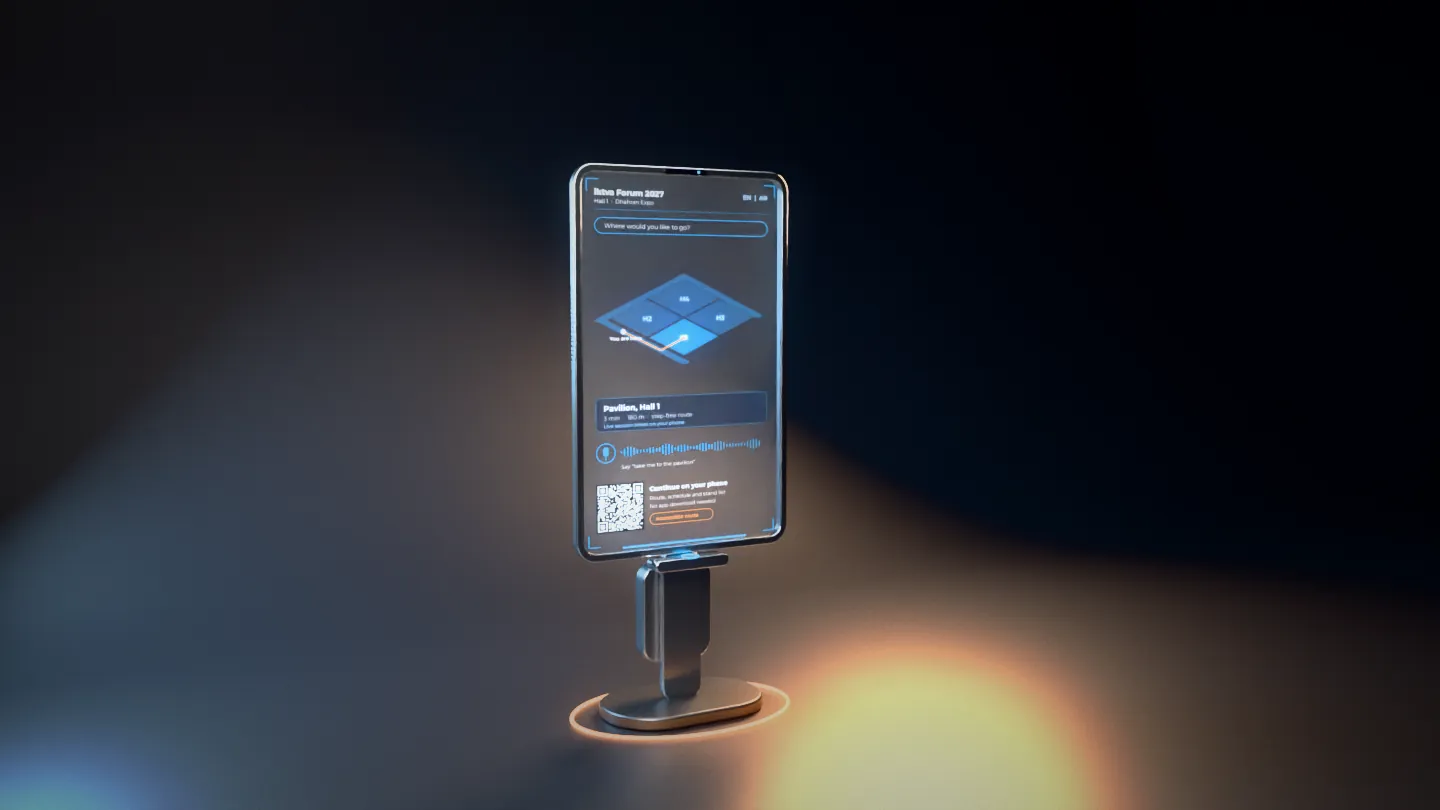
- Transparent displayA 55 inch class transparent OLED in portrait. Content sits on a clear ground, so the totem never blocks sightlines across the hall.
- TouchProjected-capacitive glass with multi-touch. A depth sensor reads the visitor’s height and moves the controls lower for a wheelchair user.
- Voice conciergeA far-field microphone array with beamforming picks out one voice in a loud hall. It understands Arabic and English and answers only from the venue’s own data: exhibitors, sessions and services.
- Spoken directionsNarrow-beam speakers keep the reply at the totem, so the next stand is not listening to it.
- Phone hand-offA QR code on screen and an NFC reader in the ledge. Both open the route as a mobile web page, so nobody downloads anything.
- Mobile app supportWhere the organiser runs an event app, the same route opens inside it through a deep link, with the visitor’s saved sessions.
- Accessible routesStep-free routing, larger text, a high-contrast mode and an audio-only mode, set from one button.
- Live dataSession changes, moved stands and busy zones arrive from the venue server, and routes adjust to them.
- Offline firstThe edge computer keeps the map and directory on board. If the hall network drops, search, routes and voice still work.
- Privacy-safe analyticsCounts only: searches, destinations, hand-offs and peak hours. The depth sensor measures presence and height and stores no images.
What happens when visitors move
- A visitor walks up. The sensor notices them and wakes the screen.
- They tap a destination or simply ask, in Arabic or English, and hear the directions.
- The route draws itself on the hall map over the clear glass.
- A QR scan or a tap sends the route to their phone, and they walk away. The next person steps up.
- Visitor
- Wayfinder and sensing zone
- Route handed to a phone
- 3
- wayfinders
- ~240
- visitors an hour
- ~45 s
- per visitor
- < 1.5 s
- spoken answer
Hardware. A weighted steel plinth with a copper floor halo that marks the totem from across the hall, two 30 mm anodised aluminium side rails that carry all the cabling, the transparent OLED with a bonded touch layer and laminated anti-glare safety glass, a sensor bar with a depth camera, ambient light sensor and microphone array, two directional speakers, a QR and NFC reader ledge, and a rear service spine holding a fanless edge computer, a network module (PoE with an optional private 5G uplink) and a power unit with surge protection and graceful shutdown.
Software. A 3D map of the venue built from the official floor plan, a search index across exhibitors, sessions and services in Arabic and English with proper right-to-left layouts, an on-device speech engine for the voice concierge, a mobile web app for the hand-off, an app link for the organiser’s event app, an admin panel for last-minute changes, and a sync service that keeps every totem on the same content.
Localisation value. Wayfinding helps visitors find the Saudi SMEs and local manufacturers who might otherwise be hard to locate in a large hall, which is exactly what a localisation forum wants. A “made in the Kingdom” filter on the directory turns the wayfinder into a guide to the local supply chain on the floor.
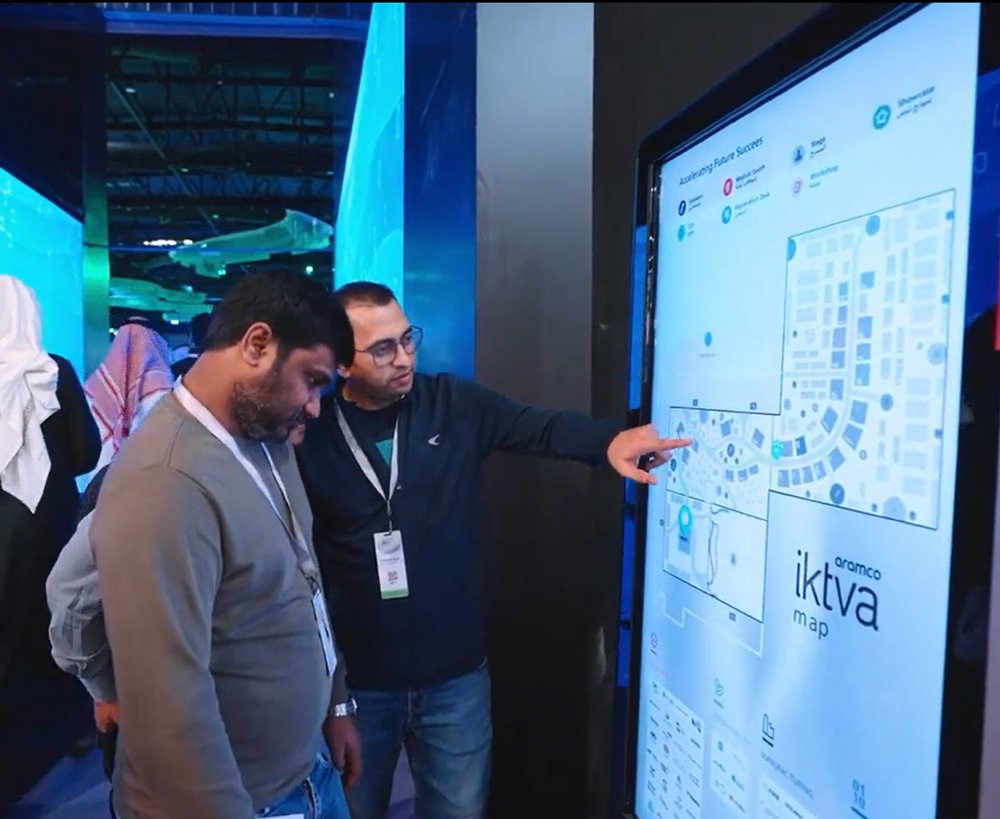
Implementation. FAIM has delivered wayfinding for iktva itself. Our Wayfinder at Aramco iktva combined interactive touch screen content with custom wayfinder apps, designed so visitors spent less time lost and more time in conversation. We are also developing a 3D kiosk wayfinder for Marina Walk at Bahrain Marina, and the transparent design above builds on both. For IKTVA 2027 we would start from the organiser’s official floor plan, load the exhibitor and session data, record and test voice prompts in Arabic and English with real visitors, and run every totem offline for a full day before the forum opens. More on our smart event technology page.
What we measure. Searches by typing and by voice, most-requested destinations, routes handed to phones and to the event app, accessible-route requests, and the zones visitors struggle to find, which the organiser can use to improve the floor plan.
The IKTVA 2027 visitor journey
Technology works when it follows the way people actually move through a hall. The diagram below shows the journey we design for: from the moment a visitor notices the stand to the follow-up that happens after the forum closes.

The order matters. A hologram at the front of a stand with no way to go deeper creates crowds but not conversations. A detailed digital twin with nothing to draw people in sits unused. Matching each technology to a stage is what turns a row of impressive screens into a journey that ends with a meeting.
System architecture: how the pieces connect
Behind every reliable stand is a simple rule: the show must run even if the venue internet does not. Our reference architecture keeps everything critical on a local network, with the cloud used only for backup, remote support and post-event reporting.
Three design choices do most of the work here. First, each experience has its own fallback: if a sensor fails, the wall drops into a self-running loop instead of freezing. Second, the show controller is the single source of truth for timing, so a VIP walkthrough can switch every screen at once. Third, analytics and personal data are kept apart. Interaction events are logged anonymously, while names and contact details are stored only when a visitor chooses to share them.
A phased delivery plan for IKTVA 2027
With the forum opening on 11 January 2027, the calendar is already short. This is the plan we work to for a stand of this kind, shown as an indicative calendar for a project starting on 20 October 2026. Timings flex with scope, and the build-up window is set by the organiser.
- 20 to 31 Oct 20261. Discovery
Workshop on your localisation story, audience and goals. Stand drawings, organiser rules, power and rigging limits.
You get: Experience concept, technology shortlist, budget range and success measures.
- 2 to 20 Nov2. Design
Visitor journey, interface design, storyboards, bilingual copy and hardware specification.
You get: Approved designs and a locked hardware list, so long-lead items can be ordered early.
- 16 Nov to 18 Dec3. Build
Custom software, 3D and film content, and integration with sensors and screens in our studio.
You get: Working builds you can review on screen, in English and Arabic.
- 14 to 23 Dec4. Test
Full rehearsal on the actual show hardware, load testing, accessibility checks and content sign-off.
You get: A signed-off system and a run sheet for the event team.
- Build-up days before 11 Jan5. Install
Installation, calibration and network setup at Dhahran Expo during the organiser’s build-up window, then a full run-through.
You get: A stand that is ready before the doors open, not during the first morning.
- 11 to 14 Jan 20276. Operate
On-site technical support for all four forum days, daily health checks and content changes on request.
You get: One team accountable for every screen on the stand.
- 15 to 28 Jan7. Report
Analytics review, lead export and lessons learned.
You get: A clear report on what worked and the next steps for your sales team.
The biggest schedule risk is not software. It is late content approval and long-lead hardware. Locking the hardware list in the design phase and agreeing an approval path with your communications team early protects the dates that cannot move.
Risks and how we manage them
| Risk | How we reduce it |
|---|---|
| Unreliable venue internet | Local-first architecture, our own router and switch, cloud used only for sync and backup. |
| Hardware failure on the day | Spare units for critical parts, self-running fallback loops, daily health checks before doors open. |
| Heat and ambient light | Ventilation in enclosed LED builds, displays chosen for hall brightness, sensors calibrated on site. |
| Queues at popular stations | Short session design, mirror screens for waiting visitors, booking slots for VR, staff guidance at peak times. |
| Late content or approvals | An agreed approval path, a content freeze date, and a bilingual content system your team can edit. |
| Hardware lead times | Hardware list locked at design stage, sourcing through regional partners where possible. |
| Data handling mistakes | Data minimisation, consent by design, encrypted storage and limited access, explained below. |
Accessibility: built in, not bolted on
A forum about shared prosperity should be open to everyone who attends. We design every interactive station with that in mind:
- Reach and height. Touch targets placed so they can be used standing or seated, with key controls within comfortable reach for wheelchair users.
- Language. Full English and Arabic interfaces with proper right-to-left layouts, not translated captions added at the end.
- Readable content. Large type, strong contrast and short copy, following the principles of the Web Content Accessibility Guidelines (WCAG).
- Light and motion. No rapid flashing in LED content, and calmer options for visitors who are sensitive to motion. VR always has a seated option and a staff member present.
- More than one way in. Every gesture-based interaction has a touch or button alternative, and video carries captions.
Data privacy and the PDPL
Interactive stands collect data, and in Saudi Arabia that data is governed by the Personal Data Protection Law. The PDPL came into force on 14 September 2023 and became fully enforceable on 14 September 2024, with the Saudi Data and Artificial Intelligence Authority (SDAIA) as the regulator. It also applies to organisations outside the Kingdom that process the personal data of people in Saudi Arabia.
Our approach is simple and conservative:
- Collect less. Most analytics need no personal data at all. Interactions are logged anonymously.
- Ask clearly. Where we collect contact details, the visitor sees a plain-language privacy notice and chooses to share. Consent boxes are never pre-ticked.
- Keep it close. Personal data stays on the local stand server during the event and is stored afterwards in line with your data residency requirements. Cross-border transfers are avoided or covered by the safeguards the PDPL requires.
- Keep it safe. Encrypted storage, restricted access, and deletion on an agreed schedule after the forum.
- Keep it honest. No personal data inside QR codes or links, and camera-based tracking counts movement without identifying people.
This is not legal advice, and your legal team should confirm the approach for your organisation. What we can promise is a system designed so that privacy compliance is easy rather than an afterthought.
Engagement analytics: what we measure and why
Every interaction on a FAIM stand is designed to produce a signal. We do not publish invented averages. Instead, we agree with you before the forum which measures matter, then report against them afterwards. A typical measurement framework looks like this:
- Attraction. Aisle passers-by compared with visitors who enter the stand, by hour.
- Engagement. Interactions per station, average session length, and depth of exploration.
- Journey. How many visitors move from one zone to the next, and where they drop off.
- Intent. Specification requests, meeting bookings, document requests and opted-in contacts.
- Quality. Leads tagged by sector, company size and interest so your sales team can prioritise.
- Follow-up. Responses to post-forum follow-ups, tracked back to the zone that started the conversation.
The output is a dashboard during the event and a report after it, with lead data exported to your CRM. Our article on lead capture architecture for exhibition stands goes into the detail.
The pavilion and wayfinder shown are FAIM design concepts created for this guide, styled after the public iktva Forum 2027 colours and typeface. They are not official iktva or Aramco designs. Figures in the interaction panels are FAIM design targets, not measured results.
Why an integrated technology partner beats an equipment supplier
Most IKTVA stands are assembled from separate suppliers: one for LED, one for the film, one for an app, one for VR. Each does its part well, and nobody owns the whole visitor experience. The gaps show on the first morning, when a podium does not talk to the wall, or the content was made for the wrong resolution.
FAIM works differently. We take responsibility for the whole system:
- Strategy. We start with your localisation story and the decisions you want visitors to make.
- Creative content. Films, 3D, motion design and interface design, made for the exact screens they will play on. See our media and content production work.
- Custom software. Touch apps, games, digital twins, wayfinding and dashboards built for your stand, not adapted from a template. See web and application development.
- Hardware integration. LED, sensors, holographic displays and VR selected and tuned to work together.
- Installation and support. Our team on site from build-up to breakdown, working with trusted Saudi partners on installation.
We have delivered this kind of work in Dhahran before: wayfinding for iktva, the multi-screen hub at EXPEC ARC and the interactive hologram at HEC. For Aramco we also created the immersive TeraPOWERS experience, combining VR journeys, LED touch walls, holographic cubes and 4K film. You can browse more of our work on the work page or try our interactive products in the FAIM experience library.
Questions clients ask
When and where is IKTVA 2027?
The iktva Forum 2027 runs from 11 to 14 January 2027 at Dhahran Expo in Saudi Arabia. The organiser’s site lists the theme as “A global platform for sustainable supply chains and shared prosperity”.
What does IKTVA stand for?
IKTVA stands for In-Kingdom Total Value Add. It is Aramco’s programme for measuring and increasing the value its suppliers create in Saudi Arabia through local manufacturing, local jobs and local supply chains.
Which interactive technology works best for an IKTVA stand?
It depends on your story. Digital twins and holograms suit manufacturers showing products, VR suits training and workforce stories, and interactive timelines suit companies showing a localisation journey. Most strong stands combine an attraction, an exploration tool and a lead capture point.
How long does it take to build an interactive exhibition experience?
A focused experience using proven components can be ready in a few weeks, while a fully custom stand with 3D content, custom software and integrated hardware needs more time. Starting early matters most for hardware ordering and content approvals.
Can interactive stands work without venue internet?
Yes. We design every system to run on its own local network, so the show continues if the hall connection is slow or drops. The cloud is used only for backup, remote monitoring and reporting.
How do interactive experiences support Saudi localisation goals?
They make localisation visible. A digital twin can show which components are made in the Kingdom, a timeline can document local milestones, and VR can show how Saudi talent is being trained. Visitors see the evidence instead of reading a claim.
Is visitor data protected under Saudi law?
Personal data collected in Saudi Arabia is governed by the Personal Data Protection Law, regulated by SDAIA. We design stands to collect as little personal data as possible, ask for clear consent, store data securely and support your legal team’s requirements.
Does FAIM only supply equipment?
No. FAIM is an integrated technology partner covering strategy, creative content, custom software, hardware integration, installation and on-site support, so one team is accountable for the whole visitor experience.
Planning your IKTVA 2027 stand?
The best IKTVA 2027 interactive technology starts with your localisation story, not a list of screens. Book a consultation with FAIM and we will map your story to a visitor journey, recommend the right mix of technologies, and give you a clear plan to be ready for 11 January. The earlier we start, the more of the calendar works for you.
Open the interactive presentation Book a consultation WhatsApp FAIM Try the experience library
Joby Thuruthel / FAIM
Found this useful?